AI coding tutorial video — Twilight desktop style
Make an AI or coding tutorial on a fake computer desktop at sunset: terminal and code windows swinging in 3D, video cards in a fan, a walking avatar.
Starter에 포함, 스타일 81개 전체와 직접 만든 스타일 포함 · 미리보기는 ClipOnIt 엔진으로 렌더링됨
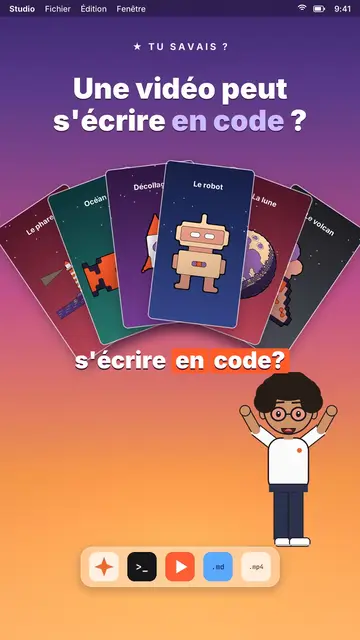
이 스타일의 모습
Twilight desktop recreates a computer desktop, with its menu bar at the top and its dock at the bottom, set on a violet, pink and peach sunset gradient. Dark windows swing open in 3D on the spoken word: a terminal typing its commands, a code editor, a recap window, a statistic. Vertical videos spread out in a fan or a grid, and a counter climbs to the announced number.
At the bottom of the screen, a full-body avatar walks from one side to the other and presents, points or raises an arm. The big white title at the top carries one word in lavender, under a small mono kicker (“★ did you know?”). An orange tag pops under a window to say “written by AI”. The end can release an army of avatar clones, then a “Comment” card with a field that types itself and a “Subscribed” card.
잘 맞는 주제
Avoid: topics far from the screen, like nature, history or sport: everything happens in a fake operating system. Also avoid emotional stories; the tone stays that of a demo.
- Coding and AI tutorialsThe terminal and the editor show the real command, line by line, as you say it.
- Tech “did you know?” clipsThe kicker and the lavender title ask the question, the swinging window gives the answer.
- Tool showcasesVideo cards in a fan show what the tool produces, without screenshots.
- Growth numbersThe counter climbing in its window makes a result concrete and measurable.
이 스타일의 영상 아이디어
- A video can be written in code
Video cards in a fan, the editor filling up and the “written by AI” tag.
- Automate a task in 3 commands
The terminal typing each command, the recap and the avatar giving a thumbs up.
- How many hours AI saved me
The stats window, the climbing counter and the grid of finished tasks.
- Make 100 videos from one script
The video grid filling up and the clone army at the end.
클릭 1번이면 완성
- 이 스타일 링크 열기
“이 스타일로 영상 만들기” 버튼을 누르면 이 스타일이 이미 선택된 편집기가 열립니다. 계정이 없어도 가입은 1분이면 되고 카드 등록은 필요 없어요.
- 주제를 한 문장으로 적어 주세요
아이디어 하나면 충분해요. 텍스트를 붙여넣거나, Starter에서 마이크에 대고 설명해도 돼요. 그러면 영상이 여러분의 목소리를 바탕으로 만들어져요.
- 검토 후 렌더링
AI가 장면을 쓰고, 스타일의 요소를 고르고, 말에 맞춰 타이밍을 맞춰요. 음성과 자막도 함께 들어가요. 어색한 부분만 고치면 세로형 MP4가 몇 분 안에 도착해요.
조정할 수 있는 항목
For each scene you pick the kicker, the title and its lavender word, the window that opens on the word (terminal, code, recap, stat, video cards or a library element), the orange tag, and the avatar's side and pose. The last scene carries the word to comment.
자주 묻는 질문
무료 여부, 결과물, 용도: 간단한 답변.
Is the code shown real?
It is the text you write in the script: commands, code lines, results. The engine types it into the window; nothing is executed.
내 목소리를 쓸 수 있나요?
Yes. Record yourself or import your audio: windows open and the terminal types on your words.
How is it different from Clean interface?
Clean interface plays the story in light windows with a clicking cursor. Twilight desktop sets dark windows swinging in 3D over a sunset, with a walking avatar.
이 스타일은 무료 요금제에 포함되나요?
아니요, Starter(월 $29)에 포함되어 있습니다. 월 15개의 워터마크 없는 영상, 81개 스타일 전체, 직접 만든 스타일을 쓸 수 있습니다. 무료 플랜은 월 3개의 영상을 워터마크와 함께 제공하며, 그 외 8개 스타일을 쓸 수 있습니다: Pixel News, Press paper, Comedy cartoon, Class sketch, Night tale, Social screen, Retro synthwave, Flat vector.
이 스타일이 마음에 든다면

UI motion design explainer video
Clean interface style · The story played out in clean interface cards: windows, buttons, a cursor clicking on the word, key word in serif.
Glassmorphism tech video
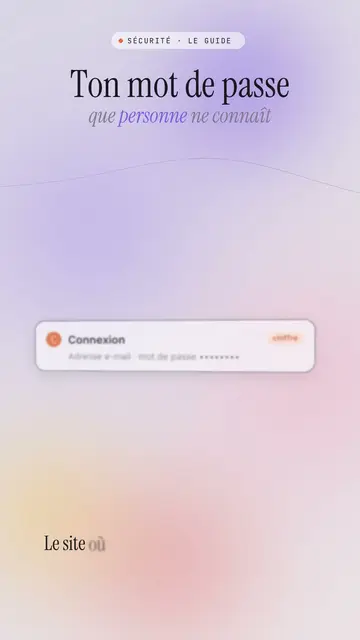
Lavender frosted glass style · Frosted glass UI cards rising and coming into focus on a lavender gradient with halos.
Content creator video
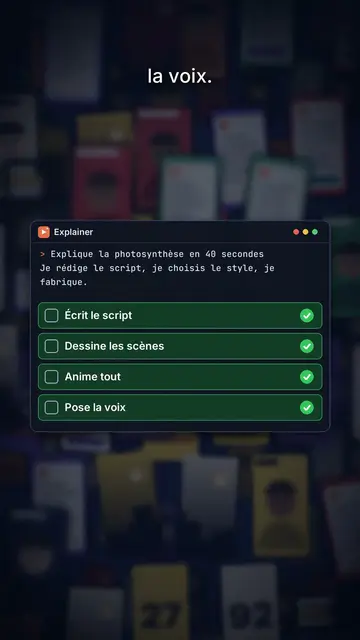
Thumbnail wall style · A midnight blue wall of video thumbnails in depth, a zoom through the wall, gold numbers.