Content creator video — Thumbnail wall style
Make a video for content creators: a wall of video thumbnails on midnight blue, a zoom through the wall, gold serif numbers and a growth curve on the word.
Starter에 포함, 스타일 81개 전체와 직접 만든 스타일 포함 · 미리보기는 ClipOnIt 엔진으로 렌더링됨
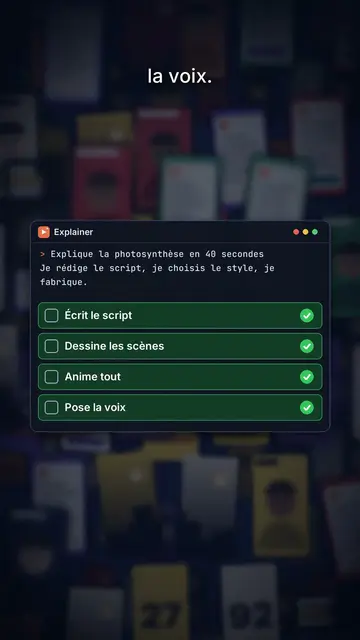
이 스타일의 모습
Thumbnail wall covers a midnight blue background with dozens of video thumbnails set in depth, like a wall of content stretching out of sight. The camera moves forward and passes through the wall: thumbnails in the middle plane stay sharp, those in front and behind blur. The big title at the top centre mixes a bold white sans-serif with words in italic serif, and key words get framed by small orange corners, like in a viewfinder.
Numbers show in giant gold serif and roll to their value, with a mono line underneath. When an object is needed, a card comes in on the word: a 3D product box in chains whose padlock pops open, a code window with a checklist, a growth curve drawing itself, a grid. The wall can darken and blur behind a card, a green “FREE” stamp lands, and the end types “Comment WORD” into a field.
잘 맞는 주제
Avoid: topics unrelated to screens or content, like cooking, nature or ancient history: the thumbnail wall would make no sense. Also avoid sad topics; the tone stays one of growth.
- Content creation methodsThe thumbnail wall speaks to creators straight away: it is their daily life.
- Tools and products to unlockThe chained box whose padlock pops shows the access you get.
- Growth figuresThe rolling gold number and the rising curve make a result feel credible.
- Free offersThe green “FREE” stamp and the comment field push viewers to act.
이 스타일의 영상 아이디어
- Nobody filmed any of these videos
The thumbnail wall, the “Zero filming” title, the gold number and the “FREE” stamp.
- Post every day without burning out
The video grid, the checklist in the code window and the rising curve.
- The format that got me to 10,000 subscribers
The zoom through the wall, the rolling number and the key word in orange corners.
- The tool I use for my thumbnails
The chained box opening, the grid and the “Comment TOOL” field.
클릭 1번이면 완성
- 이 스타일 링크 열기
“이 스타일로 영상 만들기” 버튼을 누르면 이 스타일이 이미 선택된 편집기가 열립니다. 계정이 없어도 가입은 1분이면 되고 카드 등록은 필요 없어요.
- 주제를 한 문장으로 적어 주세요
아이디어 하나면 충분해요. 텍스트를 붙여넣거나, Starter에서 마이크에 대고 설명해도 돼요. 그러면 영상이 여러분의 목소리를 바탕으로 만들어져요.
- 검토 후 렌더링
AI가 장면을 쓰고, 스타일의 요소를 고르고, 말에 맞춰 타이밍을 맞춰요. 음성과 자막도 함께 들어가요. 어색한 부분만 고치면 세로형 MP4가 몇 분 안에 도착해요.
조정할 수 있는 항목
For each scene you pick the shot (sharp wall or darkened wall behind the cards), the title and its serif words, a gold number with its line, a card on the word (box, code, curve, grid or element), a stamp, a small note at the bottom and the word to comment at the end.
자주 묻는 질문
무료 여부, 결과물, 용도: 간단한 답변.
Are the wall thumbnails real videos?
No, they are thumbnails drawn by the engine, with no real channel or creator. You can import your own images if you want to show your work.
내 목소리를 쓸 수 있나요?
Yes. Record yourself or import your audio: the zoom, numbers and cards lock onto your words.
How is it different from Social screen?
Social screen recreates a social feed with a profile, counters and comments. Thumbnail wall shows a wall of videos in depth crossed by the camera, with product cards.
이 스타일은 무료 요금제에 포함되나요?
아니요, Starter(월 $29)에 포함되어 있습니다. 월 15개의 워터마크 없는 영상, 81개 스타일 전체, 직접 만든 스타일을 쓸 수 있습니다. 무료 플랜은 월 3개의 영상을 워터마크와 함께 제공하며, 그 외 8개 스타일을 쓸 수 있습니다: Pixel News, Press paper, Comedy cartoon, Class sketch, Night tale, Social screen, Retro synthwave, Flat vector.
이 스타일이 마음에 든다면
- 무료
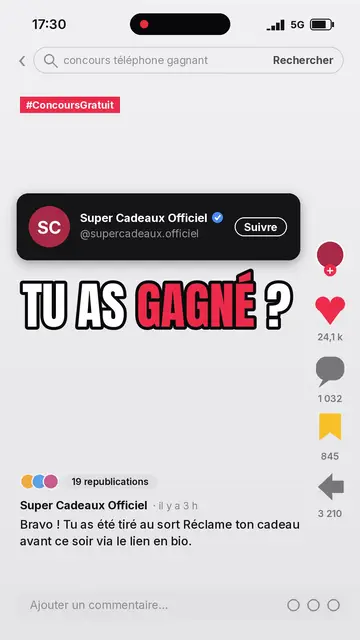
소셜 미디어용 설명 영상
소셜 화면 스타일 · 프로필, 카운터, 댓글이 있는 재현된 소셜 피드예요.

AI coding tutorial video
Twilight desktop style · A fake computer desktop on a violet-pink sunset: windows swinging in 3D, a walking avatar.

Cut-out photo dialogue video
Cut-out photo style · Black-and-white people cut out like stickers on a blue-violet gradient, a giant navy title.