Glassmorphism tech video — Lavender frosted glass style
Make an elegant tech video in frosted glass: UI cards rising as they come into focus, app icons in a grid and a serif title on a lavender gradient.
Starter에 포함, 스타일 81개 전체와 직접 만든 스타일 포함 · 미리보기는 ClipOnIt 엔진으로 렌더링됨
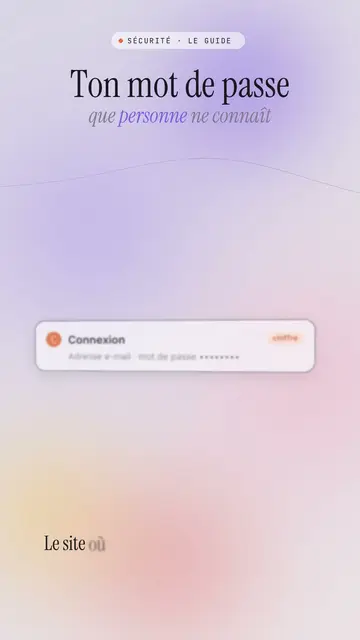
이 스타일의 모습
Lavender frosted glass sets your video on a blurred lavender and powder pink gradient, crossed by slowly moving coloured halos. White frosted glass UI cards rise from the bottom and come into focus, then stack up with a soft shadow: a login screen, a notification, a record card. Large app icons line up in a grid, and a smartphone or a 3D cloud can appear in the centre on the spoken word.
The title is an elegant serif, with a grey italic serif subtitle where some words are coloured, and a small spaced-out mono label in capitals above (“SECURITY · THE GUIDE”). A dark terminal can type its lines, a number can roll, and the screen sometimes switches to a black background with the same halos to mark a strong moment. The end shows a “Comment” bar with the word to write.
잘 맞는 주제
Avoid: raw, violent or very energetic topics: the style is soft and composed. Also avoid topics unrelated to digital life; the UI cards and icons need a screen to evoke.
- Security and passwordsThe calm, elegant tone reassures on a topic that often scares people.
- Apps and featuresThe icon grid and the smartphone show a use case without a branded screenshot.
- Cloud and AIThe 3D cloud and the stacking cards make visible what happens behind the scenes.
- Premium brands and tech lifestyleFrosted glass and the serif give a polished look, close to a keynote.
이 스타일의 영상 아이디어
- The website doesn't know your password
The login card coming into focus, the hashing terminal and the subtitle “that nobody knows”.
- 5 apps that replace your planner
The icon grid, the smartphone in the centre and the stacked notification cards.
- Where your photos go when you back them up
The 3D cloud, the rising cards and the switch to a black background.
- Two-factor authentication in 30 seconds
The six-digit code card, the phone and the number of protected accounts.
클릭 1번이면 완성
- 이 스타일 링크 열기
“이 스타일로 영상 만들기” 버튼을 누르면 이 스타일이 이미 선택된 편집기가 열립니다. 계정이 없어도 가입은 1분이면 되고 카드 등록은 필요 없어요.
- 주제를 한 문장으로 적어 주세요
아이디어 하나면 충분해요. 텍스트를 붙여넣거나, Starter에서 마이크에 대고 설명해도 돼요. 그러면 영상이 여러분의 목소리를 바탕으로 만들어져요.
- 검토 후 렌더링
AI가 장면을 쓰고, 스타일의 요소를 고르고, 말에 맞춰 타이밍을 맞춰요. 음성과 자막도 함께 들어가요. 어색한 부분만 고치면 세로형 MP4가 몇 분 안에 도착해요.
조정할 수 있는 항목
For each scene you pick the top label, the serif title and its italic subtitle with coloured words, the central visual that appears on the word (cards, icons, cloud, phone, terminal, number or comment) and the background, light by default or black for a strong moment.
자주 묻는 질문
무료 여부, 결과물, 용도: 간단한 답변.
Are the app icons real brands?
No. The icons are drawn by the engine, with no brand logo. An app's name can appear as text on a card if you write it.
내 목소리를 쓸 수 있나요?
Yes. Record yourself or import your audio: cards rise and come into focus on your words.
How is it different from Night interface?
Night interface stays dark, on midnight blue, with big numbers and sources. Lavender frosted glass is light and soft, on a pastel gradient, with glass cards coming into focus.
이 스타일은 무료 요금제에 포함되나요?
아니요, Starter(월 $29)에 포함되어 있습니다. 월 15개의 워터마크 없는 영상, 81개 스타일 전체, 직접 만든 스타일을 쓸 수 있습니다. 무료 플랜은 월 3개의 영상을 워터마크와 함께 제공하며, 그 외 8개 스타일을 쓸 수 있습니다: Pixel News, Press paper, Comedy cartoon, Class sketch, Night tale, Social screen, Retro synthwave, Flat vector.
이 스타일이 마음에 든다면
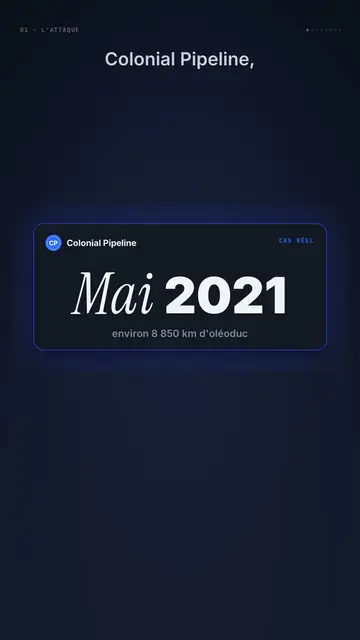
Dark UI tech explainer video
Night interface style · Dark glass cards on midnight blue, narration coming out of blur, blue, cream and black switches.
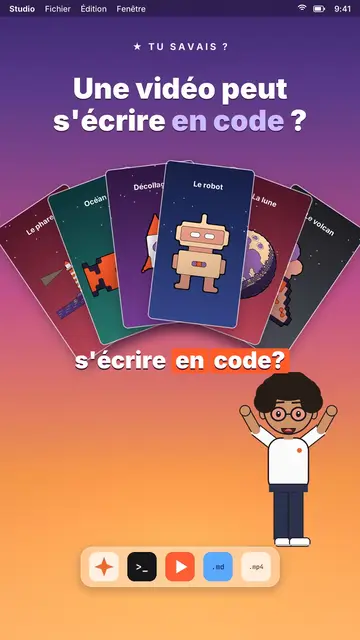
AI coding tutorial video
Twilight desktop style · A fake computer desktop on a violet-pink sunset: windows swinging in 3D, a walking avatar.

UI motion design explainer video
Clean interface style · The story played out in clean interface cards: windows, buttons, a cursor clicking on the word, key word in serif.