키네틱 타이포그래피 영상 제작 — 스위스 그리드 스타일
스위스 디자인의 키네틱 타이포그래피 영상을 만들어 보세요: 엄격한 그리드, 거대한 숫자, 경제·순위·숫자 중심 주제를 위한 데이터 바, 음성 포함.
Starter에 포함, 스타일 24개 전체와 직접 만든 스타일 포함 · 미리보기는 ClipOnIt 엔진으로 렌더링됨
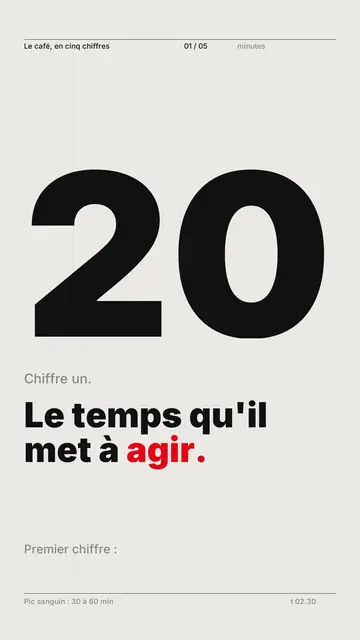
이 스타일의 모습
Swiss grid tells the story with typography alone, in the tradition of Swiss graphic design. The background is light paper, the ink nearly black, and a single signal colour, red by default, is used for everything that matters. As each scene opens, a six-column grid draws itself on screen, then a giant figure, set flush left, climbs in steps to its value, with its unit.
The title line reveals itself word by word with the voice, sliding out of a mask, and important words switch to the signal colour. Data bars, one per column, land on the beats; the signal bar alone arrives at a constant speed, to draw the eye. At the end of a scene, a coloured line slices the screen and everything collapses. The style skips fades, shadows and grain: motion is crisp, with only two easing curves.
잘 맞는 주제
Avoid: stories carried by characters, places or objects: the style draws no illustrations, only text and bars. Also avoid topics without solid figures; making up a number to fill the grid shows straight away.
- Economics and financeA rate, a price or a salary becomes the scene's giant figure, and the bars show how it changes.
- RankingsFour bars at most per scene, the top one in the signal colour: the podium reads at a glance.
- Country comparisonsThe grid lines values up side by side, which makes the gap obvious.
- Company reports and resultsThe clean look and single signal colour are easy to match with brand guidelines.
이 스타일의 영상 아이디어
- Coffee in five numbers
One scene per figure: production, price, consumption, the grower's share, and the signal bar on the surprising one.
- Inflation explained
The rate as a giant figure, then four bars for rent, energy, groceries and wages.
- The countries that work the most
Annual hours as bars, your country in the signal colour, and the line that explains the gap.
- Your year in review in one minute
The company's four key results, each with its own grid, for a report people actually share.
클릭 1번이면 완성
- 이 스타일 링크 열기
“이 스타일로 영상 만들기” 버튼을 누르면 이 스타일이 이미 선택된 편집기가 열립니다. 계정이 없어도 가입은 1분이면 되고 카드 등록은 필요 없어요.
- 주제를 한 문장으로 적어 주세요
아이디어 하나면 충분해요. 텍스트를 붙여넣거나, Starter에서 마이크에 대고 설명해도 돼요. 그러면 영상이 여러분의 목소리를 바탕으로 만들어져요.
- 검토 후 렌더링
AI가 장면을 쓰고, 스타일의 요소를 고르고, 말에 맞춰 타이밍을 맞춰요. 음성과 자막도 함께 들어가요. 어색한 부분만 고치면 세로형 MP4가 몇 분 안에 도착해요.
조정할 수 있는 항목
For each scene you set the giant figure and its unit, the grey lead-in, the title line and its words in the signal colour, up to four bars written as “label: value” (an exclamation mark picks the signal bar) and a note at the bottom. The signal colour can be changed to match your brand. You can also set the length, rewrite the narration or ask for three variants of a scene. From Starter, your own voice and the AI Director are included.
Frequently asked questions
무료 여부, 결과물, 용도: 간단한 답변.
What is kinetic typography?
A video where the text itself moves and carries the message, instead of illustrations. Here, words appear with the voice, numbers climb and bars land inside a Swiss design grid.
Are the numbers checked?
AI writes from your topic, but it is up to you to check each value before rendering. The safest way is to paste your own text with your sources: the bars then use your figures.
Can I use my brand colours?
Yes, the signal colour can be changed. Keep just one: that is what makes the style readable.
이 스타일은 무료 요금제에 포함되나요?
아니요, Starter(월 $29)에 포함되어 있습니다. 월 15개의 워터마크 없는 영상, 24개 스타일 전체, 직접 만든 스타일을 쓸 수 있습니다. 무료 플랜은 월 3개의 영상을 워터마크와 함께 제공하며, 그 외 8개 스타일을 쓸 수 있습니다: Pixel News, Press paper, Comedy cartoon, Class sketch, Night tale, Social screen, Retro synthwave, Flat vector.