위성 지도 설명 영상 — 위성 브리핑 스타일
실제 위성 이미지로 설명 영상을 만드세요: 상공 비행, 핀, 경로, 출처를 화면에 표시합니다. 지리, 분쟁, 무역 경로, 뉴스를 위해 제작되었습니다.
Starter에 포함, 스타일 24개 전체와 직접 만든 스타일 포함 · 미리보기는 ClipOnIt 엔진으로 렌더링됨
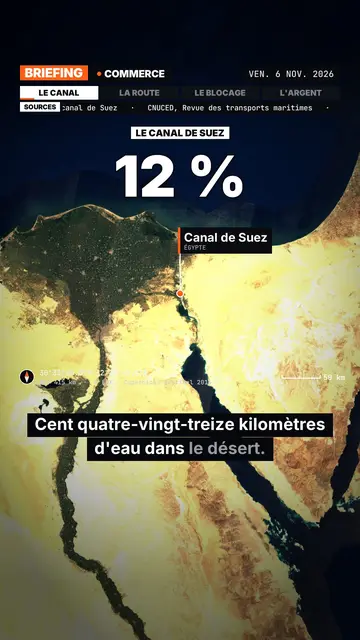
이 스타일의 모습
Satellite briefing tells your topic from above, on real satellite imagery. In each scene, the camera climbs then dives onto the next place, and drops a pin with the place's name and country. It can also point at several places at once or draw a route between two points, with labelled ends: a shipping lane, a pipeline, a front line.
Around the map sits an investigation-desk frame: series label, topic, date, chapter tabs and a scrolling “Sources” line that includes the imagery credit. Instruments fill out the screen (compass, coordinates, altitude, scale bar). On the dimmed map, an inset can show a library element, an image you import or data bars, and captions light up word by word.
잘 맞는 주제
Avoid: topics that do not happen anywhere in particular (psychology, tips, abstract ideas) and indoor scenes: the map then has nothing to show. The imagery is a cloud-free mosaic from a single year, so it cannot show a recent change on the ground.
- Geography and bordersShowing where a strait, an enclave or a disputed border sits beats describing it.
- Conflicts and world newsPins and routes place the facts, and the sources line reminds viewers where the information comes from.
- Trade and supply chainsA cargo ship crossing a canal, coffee crossing an ocean: the drawn route makes the journey obvious.
- MegaprojectsA dam, a new city or an airport makes more sense when you can see its footprint on the ground.
이 스타일의 영상 아이디어
- Why the Suez Canal matters so much
The camera follows a cargo ship from Asia to Europe, then draws the detour around Africa if the canal closes.
- The journey of a coffee bean
A pin on a plantation, another on a port, then the route all the way to your cup.
- What is at stake in a strait
Zoom on the passage, the bordering countries pinned, and data bars on the traffic going through.
- A city built in the desert
A flyover of the site, a scale bar on screen, and an inset with the project image you import.
클릭 1번이면 완성
- 이 스타일 링크 열기
“이 스타일로 영상 만들기” 버튼을 누르면 이 스타일이 이미 선택된 편집기가 열립니다. 계정이 없어도 가입은 1분이면 되고 카드 등록은 필요 없어요.
- 주제를 한 문장으로 적어 주세요
아이디어 하나면 충분해요. 텍스트를 붙여넣거나, Starter에서 마이크에 대고 설명해도 돼요. 그러면 영상이 여러분의 목소리를 바탕으로 만들어져요.
- 검토 후 렌더링
AI가 장면을 쓰고, 스타일의 요소를 고르고, 말에 맞춰 타이밍을 맞춰요. 음성과 자막도 함께 들어가요. 어색한 부분만 고치면 세로형 MP4가 몇 분 안에 도착해요.
조정할 수 있는 항목
You can write the series label, topic, date and chapters on the bar, the list of sources, the stamp title, the kicker and the big figure. Places are given by name: AI puts them on the map, and you can add pins or draw a route. For an inset, pick a library element, import your image or enter data bars. Length, narration and three variants per scene stay adjustable; from Starter, your own voice and the AI Director.
Frequently asked questions
무료 여부, 결과물, 용도: 간단한 답변.
Is the satellite imagery real?
Yes. The views come from a public, cloud-free satellite mosaic, credited on screen and in the sources line. They are archive images, not live views.
Does the AI make up sources?
No. The script is written never to invent a source: you add your own, and the “Sources” line shows what you provided.
How far can it zoom in?
Down to the scale of a city or a large site, such as a port or a dam. You cannot make out a single house or car.
이 스타일은 무료 요금제에 포함되나요?
아니요, Starter(월 $29)에 포함되어 있습니다. 월 15개의 워터마크 없는 영상, 24개 스타일 전체, 직접 만든 스타일을 쓸 수 있습니다. 무료 플랜은 월 3개의 영상을 워터마크와 함께 제공하며, 그 외 8개 스타일을 쓸 수 있습니다: Pixel News, Press paper, Comedy cartoon, Class sketch, Night tale, Social screen, Retro synthwave, Flat vector.
이 스타일이 마음에 든다면
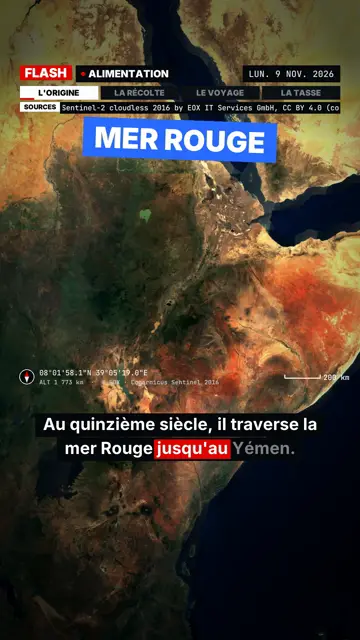
Breaking news explainer video
Flash brief style · News without a dull second: slammed captions, word-tracking box, satellite map and black panels.
- 무료
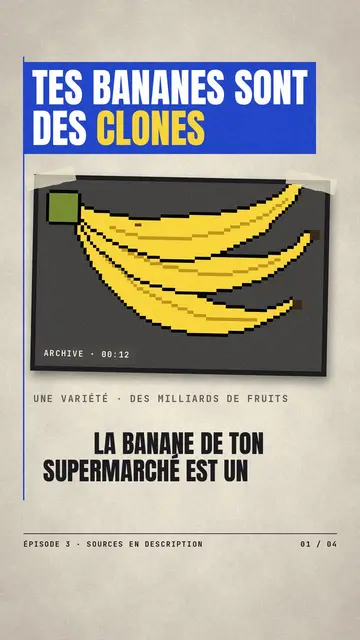
종이 컷아웃 뉴스 영상
종이 공예 스타일 · 크림색 에디토리얼 종이, 파란색과 빨간색 배너, 스탬프.
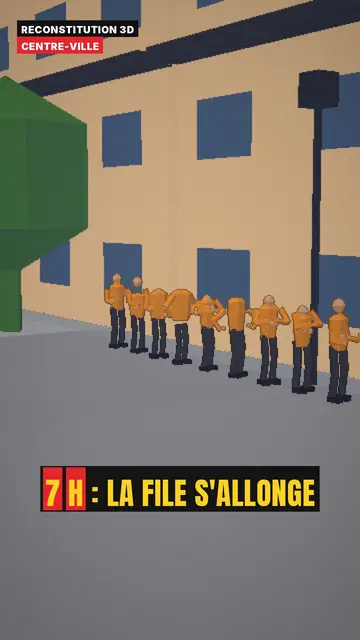
3D reconstruction animation
3D reconstruction style · Colourful daylight low-poly streets and interiors.