오피스 만화 애니메이션 영상 — 오피스 툰 스타일
오피스 만화 영상 만들기: 넓은 개방형 사무실이나 주방을 배경으로 한 대두 만화 캐릭터, 음성과 자막 포함. 교육, 인사, 팀 생활용.
Starter에 포함, 스타일 24개 전체와 직접 만든 스타일 포함 · 미리보기는 ClipOnIt 엔진으로 렌더링됨
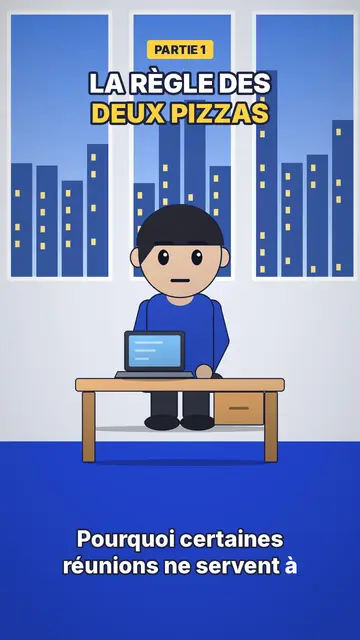
이 스타일의 모습
Office toon draws big-headed characters with shiny black oval eyes and pink cheeks, with soft shading, light at the top and darker at the bottom, and a drop shadow on the floor. The result feels like a 3D animated film while staying a crisp 2D picture. Scenes take place in two familiar sets: an open-plan office with a bright blue floor and windows onto the city, and a kitchen with grey-green cupboards.
A yellow label at the top announces the part (“PART 1”), the title is set in white and yellow outlined in midnight blue, and captions stay low-key, in lowercase, at the bottom. A character can stand in front of a presentation screen to show a figure or an instruction. Between shots, a small zoom settles on the next scene. The overall tone is friendly, which gets a rule or a tip across without lecturing.
잘 맞는 주제
Avoid: topics set outdoors, far from an office or a kitchen (travel, nature, geography): the style's sets are mostly indoors. Also avoid serious topics such as a layoff or harassment, where the cute tone of the characters can feel out of place; a more sober style suits them better.
- Internal trainingA procedure, a tool or a safety rule is shown with colleagues in a setting that looks like their own.
- Onboarding new hiresSplit into numbered parts, the first week becomes a short series that is easy to follow.
- Career tipsNegotiating, asking for feedback, turning down a meeting: the characters act out the scene before the tip.
- Small everyday scenesThe kitchen also works for home topics: budget, groceries, planning the week.
이 스타일의 영상 아이디어
- Spotting a phishing email
A colleague at their screen, three clues that give the fake message away, and the right reflex in part 3.
- Your first week on the team
Five short parts: badge, tools, rituals, who to contact, where to have lunch.
- The meeting that could have been an email
Four characters round a table, the clock ticking, then a simple rule to avoid it.
- Asking for a raise
The character prepares at the coffee machine, then the meeting is replayed in two versions.
클릭 1번이면 완성
- 이 스타일 링크 열기
“이 스타일로 영상 만들기” 버튼을 누르면 이 스타일이 이미 선택된 편집기가 열립니다. 계정이 없어도 가입은 1분이면 되고 카드 등록은 필요 없어요.
- 주제를 한 문장으로 적어 주세요
아이디어 하나면 충분해요. 텍스트를 붙여넣거나, Starter에서 마이크에 대고 설명해도 돼요. 그러면 영상이 여러분의 목소리를 바탕으로 만들어져요.
- 검토 후 렌더링
AI가 장면을 쓰고, 스타일의 요소를 고르고, 말에 맞춰 타이밍을 맞춰요. 음성과 자막도 함께 들어가요. 어색한 부분만 고치면 세로형 MP4가 몇 분 안에 도착해요.
조정할 수 있는 항목
You change the yellow label (“PART 2”, “STEP 3”), the title and its yellow word, the text on the presentation screen, the narration and each scene's length. You pick the set, office or kitchen, move or swap a character or an object, and can ask for three variants of a scene. From Starter, your own voice and the AI Director; the brand kit applies your logo and colours to the render.
Frequently asked questions
무료 여부, 결과물, 용도: 간단한 답변.
Can I make a corporate training video with this style?
Yes, that is its main use: toon colleagues in an office that looks like a real one, one part per step, and a voice that explains. You write the topic or paste your procedure, and AI splits it into scenes.
Is it real 3D?
No, it is 2D with soft shading and a drop shadow that imitates an animated film look. The picture stays light and crisp on mobile.
How do I make a multi-part series?
Make one video per part and change the yellow label each time. Since characters and sets stay the same, the series keeps a consistent look.
이 스타일은 무료 요금제에 포함되나요?
아니요, Starter(월 $29)에 포함되어 있습니다. 월 15개의 워터마크 없는 영상, 24개 스타일 전체, 직접 만든 스타일을 쓸 수 있습니다. 무료 플랜은 월 3개의 영상을 워터마크와 함께 제공하며, 그 외 8개 스타일을 쓸 수 있습니다: Pixel News, Press paper, Comedy cartoon, Class sketch, Night tale, Social screen, Retro synthwave, Flat vector.
이 스타일이 마음에 든다면
- 무료
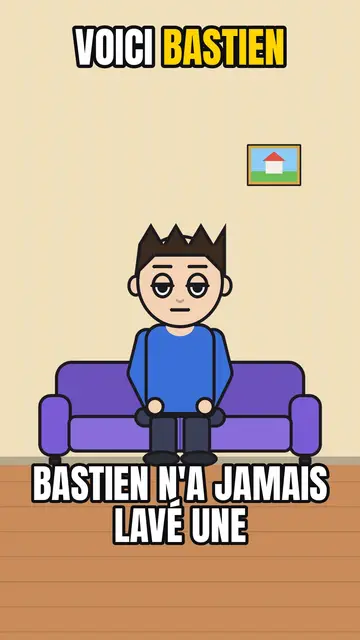
AI cartoon video generator
Comedy cartoon style · Comic cartoon, expressive characters with bold outlines.
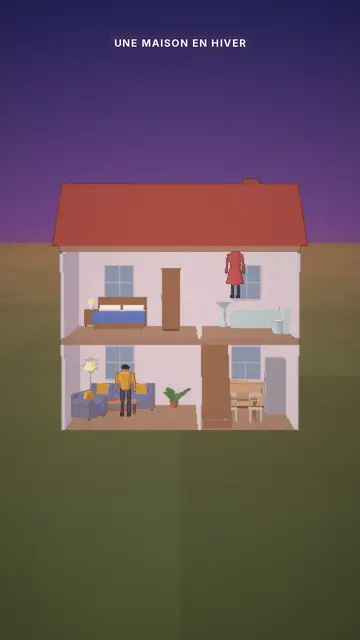
Cutaway house 3D animation
Cutaway house style · A dollhouse-style cutaway with lit rooms.
- 무료
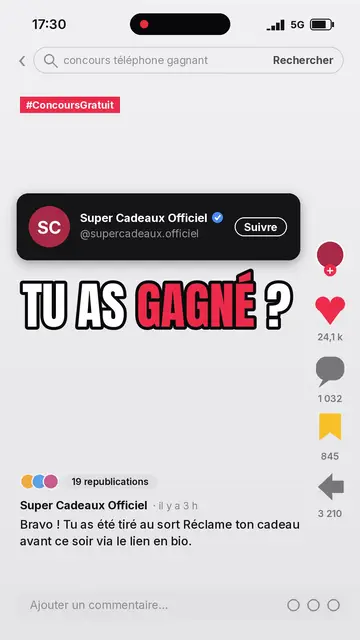
Social media explainer video
Social screen style · A recreated social feed: profile, counters, comments.